


Why I replaced Ghost with a static site
RoboDodd has run on Ghost since 2022. Ghost is a great CMS, but the more I thought about what I actually needed — a place where people can read articles — the clearer it got that most of what was running existed for reasons I wasn’t using.
Security was the biggest reason. Every dynamic service is an attack surface. Login endpoints, admin panels, content APIs, database connections — all things automated scanners probe constantly, looking for the week’s fresh CVE. A running CMS is a running target: keeping it safe means keeping up with patches, tracking advisories, and trusting that every transitive dependency in the stack gets security updates faster than anyone can exploit them. Miss one, and someone else is running your site.
A folder of static HTML files has none of that. There’s no login to brute-force, no database to query, no server-side code to exploit. There’s no admin panel to break into because there is no admin panel. The only thing a visitor’s browser can do is download pre-rendered pages — which is all I wanted it to do in the first place.
Efficiency comes out of that same simplification. A read-only site doesn’t need a database or a backend. Static HTML served from object storage costs pennies per month. Nothing to patch, nothing to back up, nothing running while I sleep.
Cost reminded me of the first two every month.
So I built a replacement. The goal was simple: write posts in a nice local editor, save them as JSON and Markdown, build static HTML, ship it to cheap storage. Total control, minimal moving parts, nothing to break into.
How the system works
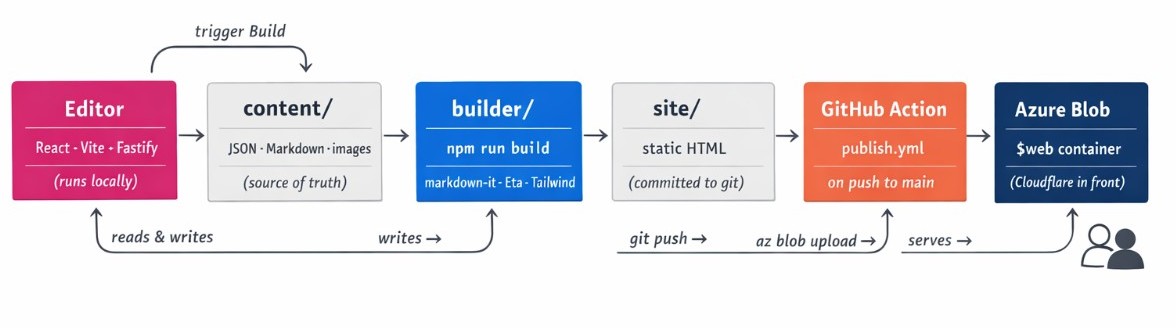 Four small pieces, each doing one thing:
content/— the source of truth. One JSON file per post, one per page, plus a tags list and site settings. Images live in a dated folder structure.editor/— a React app I run locally. Never deployed. It reads and writes the JSON files through a tiny local backend.builder/— a Node script that turnscontent/into a staticsite/folder: every post becomessite/<slug>/index.html, plus home pages, tag pages, RSS, and a sitemap.- GitHub Action — on push to
main, syncssite/to an Azure Blob Storage container, which serves it as a static website.
That’s it. npm run import seeded everything from the Ghost export once. After that it’s npm run build and git push.
Importing posts from Ghost
Ghost has an Export your content button that hands you one big JSON file. I wrote a script that reads it, converts each post’s HTML body to Markdown, preserves the special Ghost blocks that don’t round-trip cleanly (bookmark previews, galleries, callouts), and downloads every referenced image into the repo.
 Every post ends up as a plain, readable JSON file. Easy to diff, easy to edit by hand, and future-me will never be locked out by a proprietary format.
One moment I enjoyed: Cloudflare sits in front of robododd.com and — naturally — blocked my importer from downloading my own images. 403 cf-mitigated: challenge on every single file. I paused the rule for five minutes, re-ran the importer, grabbed all 328 images in under a minute, and turned it back on. Funny getting rate-limited by your own site.
A local editor for writing posts
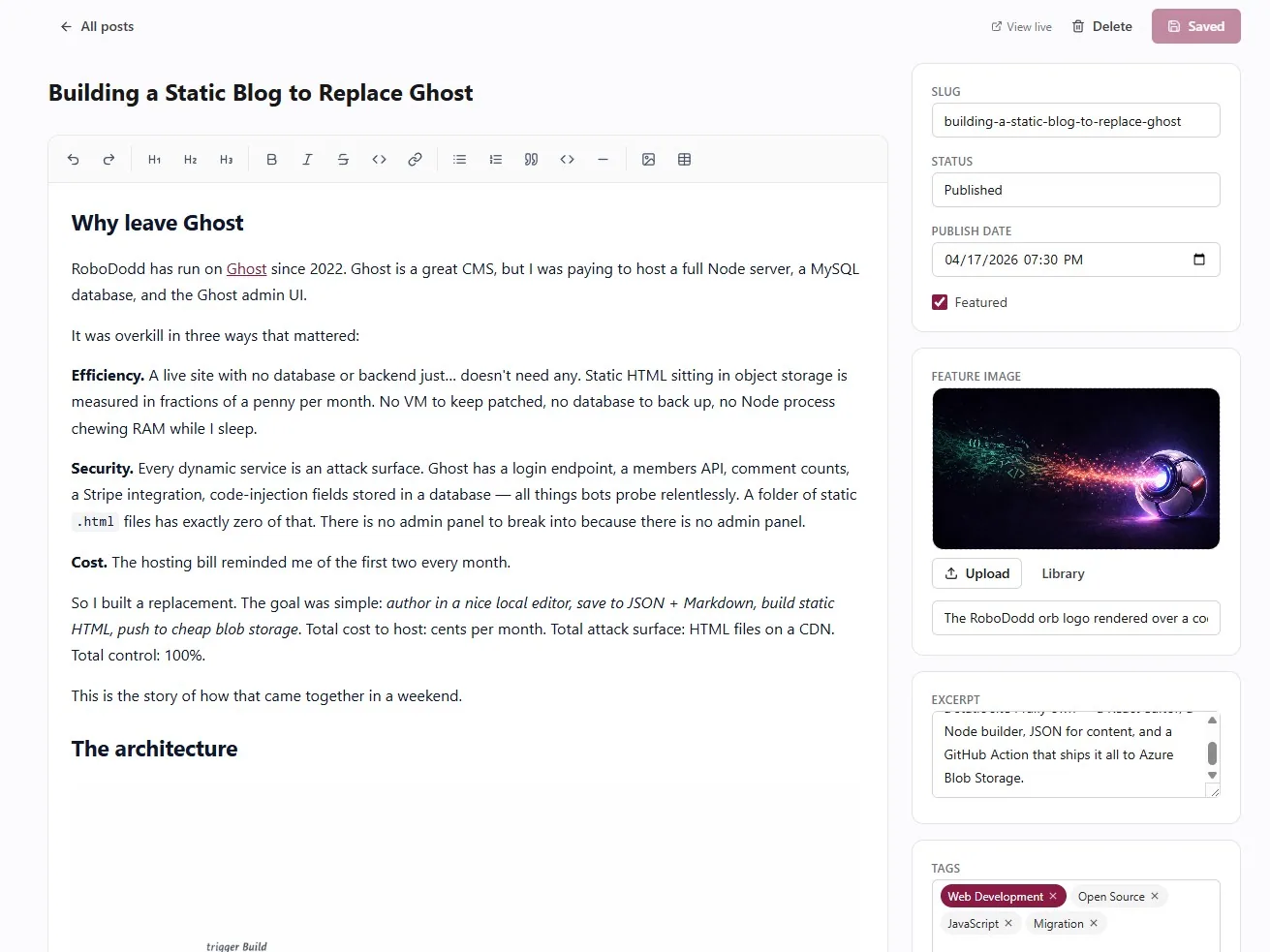 I spent the most time on the edito. It runs locally, feels like a polished CMS, and writes straight to the JSON files.
It handles posts, pages, tags, images, and site-wide settings. Each post has a rich Markdown editor on the left and a sidebar for metadata on the right — title, status, publish date, tags, feature image, excerpt. There’s a drag-and-drop image library, and drafts live in a gitignored folder so half-finished posts never accidentally ship.
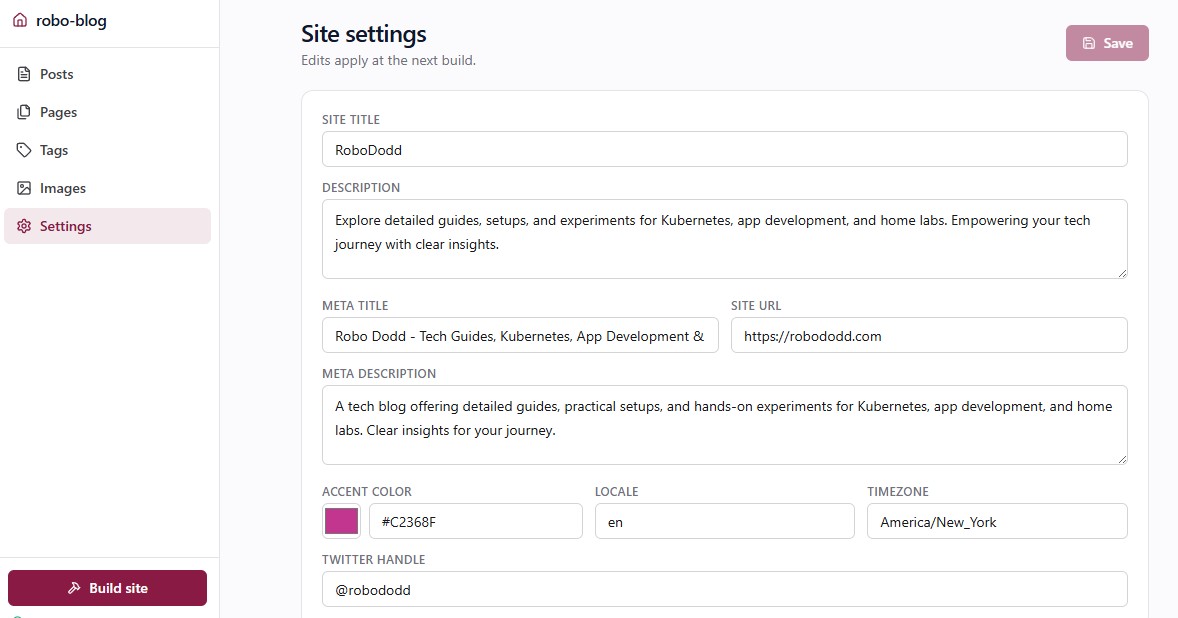 The Site settings screen also has a code-injection section for pasting Google Analytics tags, custom CSS, or any raw HTML that needs to land in
 <head> or before </body> on every page. Pragmatic escape hatch.
One-click build from the editor
Since the editor already has a local backend, I wired up a Build site button that runs the builder and streams the log back in real time. No alt-tab to a terminal.
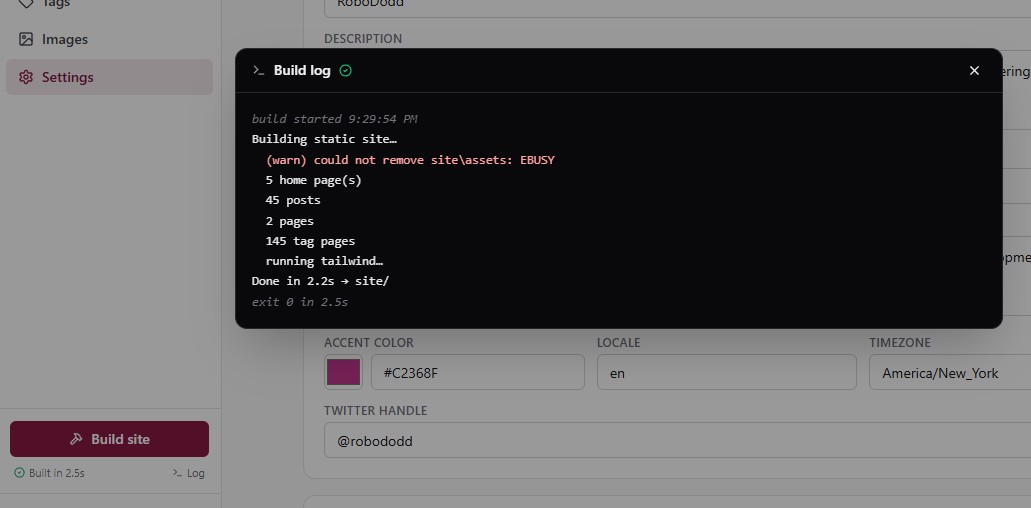 Click, watch it go, see “Built in 8.2s”. If something fails, the error is right there in the panel. Small feature, large quality-of-life win.
Small touches that matter
- Image lightbox. Click any image in a post (including galleries) and a full-screen overlay opens with ← → navigation and keyboard support.
- Image optimizer. One command converts large images to WEBP, resizes anything oversized, and rewrites every reference across the content. My initial pass cut the image folder from 40 MB to 15 MB.
- Syntax-highlighted code with a copy-to-clipboard button, all rendered at build time — no runtime JavaScript, no flash of unstyled code.
- Auto social icons. Add a LinkedIn link in site settings and the LinkedIn glyph appears in the top bar. Same for GitHub, X, email, RSS.
- Gradient top bar that echoes the logo palette (navy → purple → magenta → peach).
 ## Publishing to Azure Blob Storage
Shipping a post is three steps:
- Write it in the editor.
- Click Build site.
git push.
A GitHub Action watches the site/ folder and, on every push, syncs it to an Azure Blob $web container that serves the static site. Cloudflare sits in front for caching and SSL. That’s the whole deploy story.
Migrating from Ghost (or anywhere else)
Here’s the part I find most satisfying: I never touched Ghost’s database or API. I clicked Settings → Labs → Export your content, got a JSON file, and wrote an importer that translated it into my content model.
That boundary matters. The importer is the only piece of code that cares where the data came from. Everything downstream — the builder, the editor, the deploy — reads from content/. Swap the importer for one that parses a WordPress export, a Jekyll _posts/ folder, or a Notion export, and the rest of the system doesn’t notice.
So if you’re on Ghost and want to do what I did:
- Fork the repo.
- Export your content from Ghost → drop the JSON at the repo root.
npm install && npm run import.- Edit title, accent color, and navigation in the settings screen.
npm run build— you have your site.
On a different platform you’re writing one script — an afternoon of work — and you inherit everything else. It’s a migration path, not a walled garden. The full source is public, and that’s where to look if you want the deep-dive.
What this looks like in numbers
- Build time: 8 seconds for 47 posts.
- Runtime services: none. No Node process, no database, no admin endpoint.
- Attack surface: static HTML on a CDN.
- Hosting bill: pennies per month.
- Ghost install: retired.
The editor is a pleasure to use. The site loads instantly. Nothing is “managed” by anyone but me, and nothing runs unless I tell it to.
If you’re paying to host Ghost (or any other CMS) for a read-only blog, I’d bet you can replace it with a weekend of work — and retire a whole class of security risk while you’re at it. That’s what I did, and I’m not going back.